鉴于本人latex经验几乎为0,虽然可以利用AI来编辑.tex文本,但是觉得这样还是太浅显了,还是能看懂为好。
安装与配置可以见上一篇
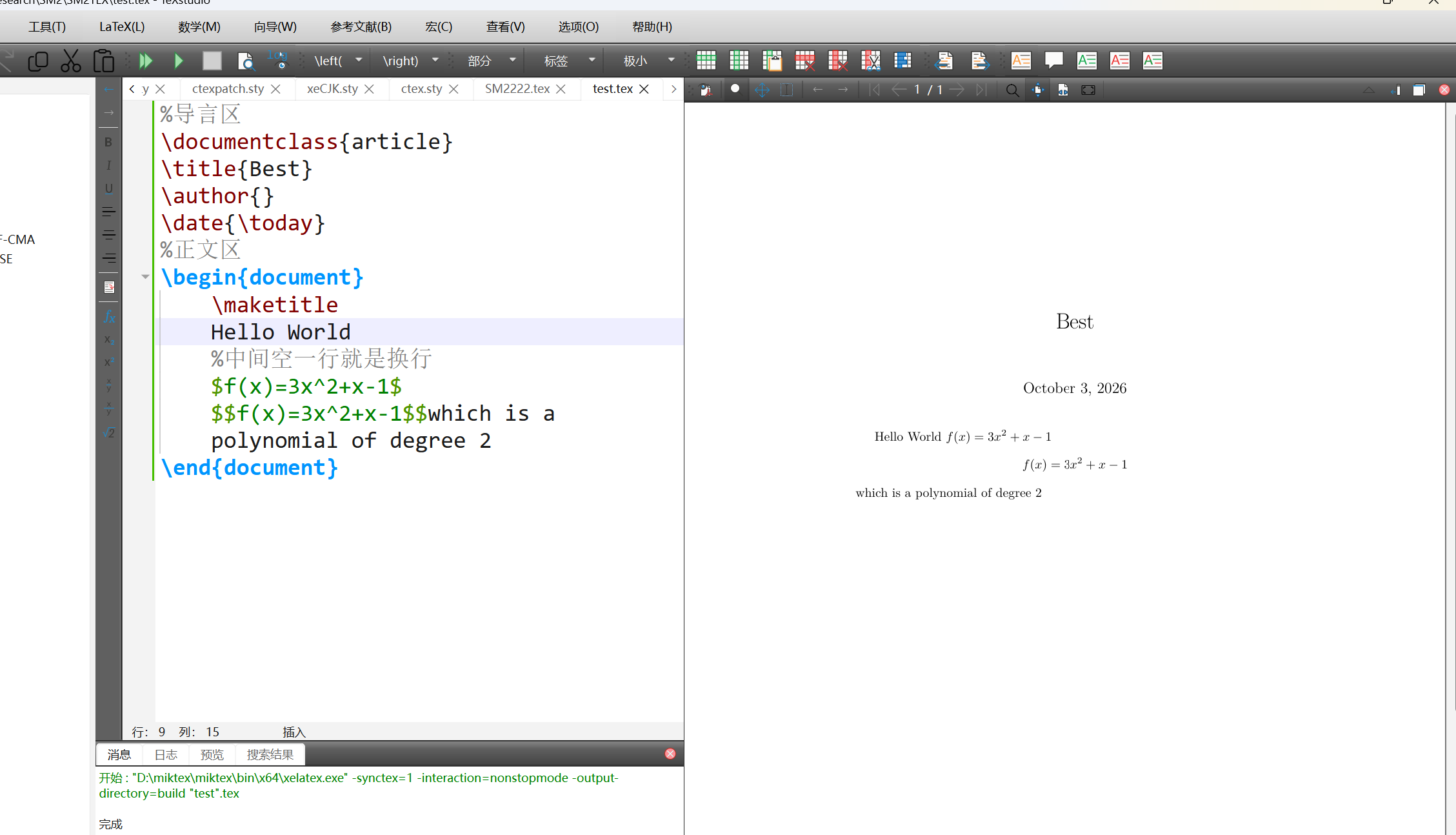
Latex源文件的基本结构 %:注释
$$:公式块
1 2 3 4 5 6 7 8 9 10 11 12 13 14 15 16 \documentclass {article}\title {标题}\author {作者}\date {\today }\begin {document} \maketitle 内容... Let$ f(x)$ be defined by the formula $ f(x)=3x^ 2+x-1$ $ $ f(x)=3x^ 2+x-1$ $ which is a polynomial of degree 2 \end {document}
Latex中文处理
这个上一篇博客里面有具体写配置问题。
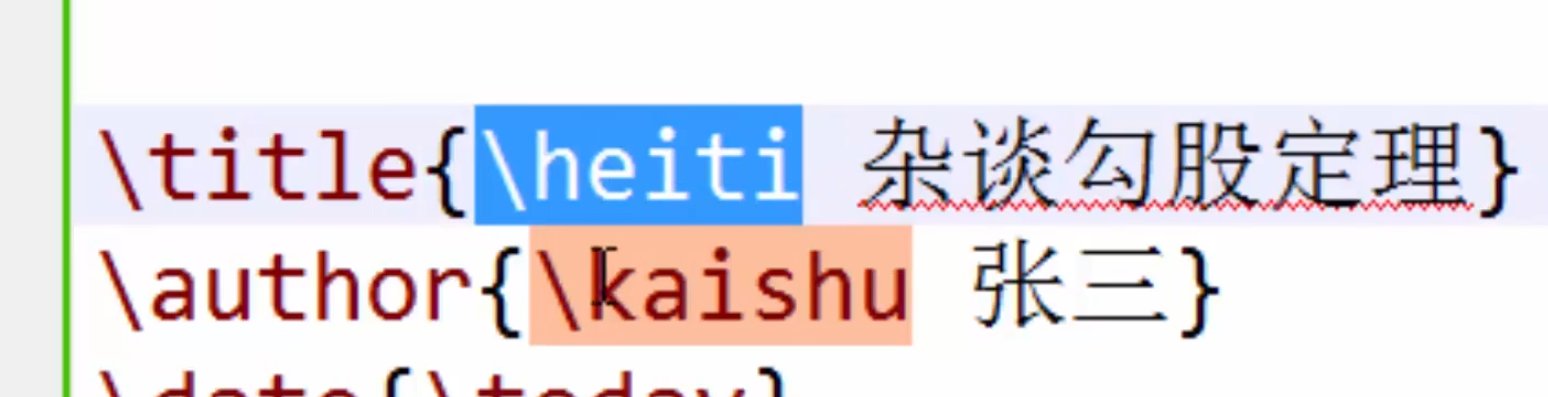
保证编码为UTF-8,写中文时还可以指定字体
1 2 3 4 5 6 7 \documentclass {article}\usepackage {ctex}newcommand\. ..{}
在终端中输入texdoc ctex,可以查看ctex包的具体信息
Latex字体字号设置 字体属性
字体族
罗马字体、无衬线字体、打字机字体
1 2 3 4 5 6 7 8 9 \textrm {}\textsf {}\texttt {}\rmfamily Roman Family
字体系列
1 2 3 4 5 6 7 8 9 10 11 12 13 14 15 16 17 18 19 20 21 22 23 24 \textmd {Upright Shape}\textit {Italic Shape}\textsl {Slanted Shape}\textsc {Small Caps Shape}{\upshape ...} {\itshape ...} {\slshape ...} {\scsshape ...} {\songti 宋体} {\heiti 黑体} {\fangsong 仿宋} {\kaishu 楷书} {\tiny }\\ {\scriptsize } \zihao {-0} 你好!
Latex文档的基本结构 1 2 3 4 5 6 7 8 9 10 11 12 13 14 15 16 17 18 19 20 \ctexset { section={} } \begin {document} \tableofcontents \section {引言} \section {实验方法} \section {实验结果} \subsection {数据} \subsection {图标} \subsubsection {实验条件} \section {结论} \section {致谢} \end {document}
Latex中的特殊字符 1 2 3 4 5 6 7 8 9 10 11 12 13 14 15 16 \section {空白符号} a\quad b a\qquad b a\enspace b a\ b a~b
Latx中的插图 1 2 3 4 5 6 7 8 9 10 11 12 13 14 15 16 \usepackage {graphicx}\includegraphics [<选项>]{<文件名>}\graphicspath {{figures/}}\begin {document} \LaTeX {}中的插图 \includegraphics {<文件名>} \includegraphics []{} \end {document}
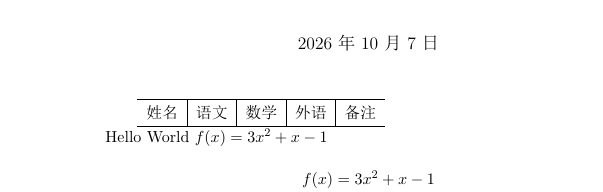
Latex中的表格 1 2 3 4 5 6 7 8 9 10 11 12 13 14 15 16 \begin {document} \begin {tabular}{l c c c r} \begin {tabular}{l|c|c|c|r} \begin {tabular}{l|c|c|c|r} \hline 姓名& 语文& 数学& 外语& 备注\\ \hline \begin {tabular}{l|c|c|c|p{1.5cm}|} \end {tabular} \end {document}
当然还有很多的线条可以去添加
texdoc booktab
texdoc longtab
具体需要可查阅宏包
Latex中的浮动体 1 2 3 4 5 6 7 8 9 10 11 12 13 14 15 16 17 18 \begin {document} \LaTeX {}中的插图 \begin {figure}[] \includegraphics []{} \caption {} \end {figure} \LaTeX {}中的表格 \begin {table} \begin {tabular}{l|c|c|c|r} \hline 姓名& 语文& 数学& 外语& 备注\\ \hline \end {tabular} \end {table} \end {document}
Latex数学公式初步
这个和markdown语法很像,有基础就方便多了
1
2
3
4
5
6
7
8
9
10
11
12
13
14
\section {行内公式}\subsection {美元符号}$ a+b=b+a$ \subsection {小括号}\( a+b=b+a\) \subsection {math环境}\begin {math}a+b=b+a \end {math}\section {上下标}\subsection {上标}$ ^ $ \subsection {下标}$ _ $
Latex数学公式矩阵 Latex数学公式的多行公式 Latex中的参考文献BibTex Latex中参考文献BibLatex Latex中的自定义命令和环境